


BeforeAfter
Christmas PFP
Santa hat

A holiday photo studio in your browser
Your next Christmas PFP starts with a selfie already on your phone. Upload it, pick a look such as a Santa hat, anime art or a 3D cartoon, and download a square profile picture. Other holiday edits sit in the same studio.
Starter pack $5.993 photos at 2K (30 credits) or 6 at 1K. One-time payment, credits never expire.
1Upload your photo
Pick a bright, sharp photo showing one face.
You can also drop files on the boxes or paste an image with Ctrl+V (⌘V).
2Pick your Christmas effect
3Choose quality & format
Type a name or an extra detail, or leave it blank to get the style as designed.
This Christmas PFP: 10 credits. A one-time Stocking pack ($5.99) covers it, and pack credits never expire.
When you start, you confirm you are allowed to use every photo you upload. Terms of Service
Pay once, nothing renews · Credits come back if a creation fails · Sign in to create
Tap a look and press Make it to load that effect in the studio.
Santa hat


Santa suit


By the tree

Classic Red & Gold


Gifts by the tree


Classic Christmas
A Christmas PFP holiday studio
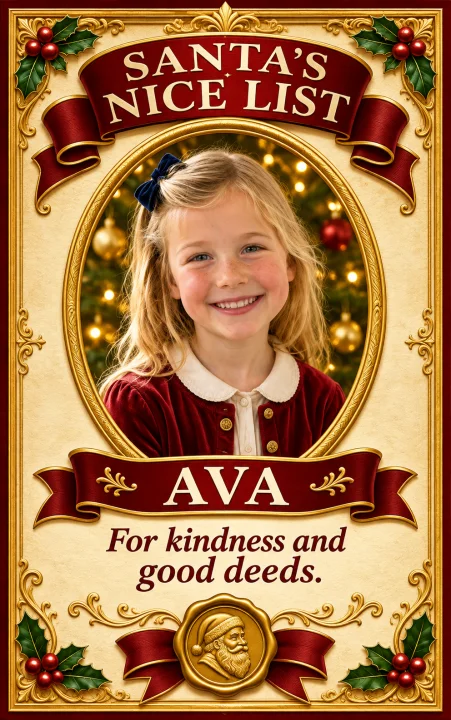
Christmas PFP is a browser studio for Christmas profile pictures. You upload a selfie, choose one of six holiday styles and get a square image sized for an avatar. The same studio also makes Nice List certificates, pet Christmas portraits and photos with Santa from your own photos.
A Christmas PFP is simply the profile picture you wear for the season. Instead of hunting for a stock image, you start from your own face, so the result still looks like you, just with a Santa hat, an anime finish or a snowy backdrop added.
PFP results come out at 1:1, the shape most profile slots crop to. Certificates and pet portraits use a tall 9:16 frame that fits a phone screen.
Christmas PFP studio: start from a selfieSteps
Everything happens in your browser, on a phone or a computer. There is nothing to install and no editing software involved.
Choose one photo where your face is sharp and evenly lit. A plain head-and-shoulders shot works better than a group picture or a far-away snap.
Christmas PFP is selected first and offers six styles. You can switch to Santa Nice List, Christmas pets or Photo with Santa instead, and add an optional detail such as a color or a prop.
Look over the finished image, download it, then upload it as your new avatar wherever you like. Nothing is posted for you.
Use cases
Pair a child’s photo with their name to make a printable-style certificate from Santa’s list. It is a made-up holiday keepsake, which is part of the fun.
Trade your usual headshot for a Christmas profile picture with a Santa hat, a cozy sweater by the fire or an anime twist, then switch back in January.
Add Santa beside your family, your kids or your pets in a photo you already have, by the tree, in the grotto or out in the snow.
Upload your dog or cat and choose a look like an elf costume or a fireside rug. Two separate pet photos can be combined into one picture.
Pricing
Every creation is paid in credits: a photo is 10 credits at 2K or 5 at 1K. Buy a pack once and spend it this season or next.
Purchased credits can be shared: make a gift link and every friend who opens it claims an equal share for their own holiday photos.
How gifting works| Image model | 1K | 2K |
|---|---|---|
| Nano Banana 2Santa Nice List, Christmas PFP, Christmas pets | 5 credits | 10 credits |
Secure checkout · One-time packs never expire · Nothing renews
Why Christmas PFP
A picture of you, your kid or your dog already carries the face people recognize. The studio only adds the holiday part.
When a generation fails, the credits it used go back to your balance on their own, so you can try again.
The hat, the sweater, the snow and the lights are drawn in by the AI. You do not need props, a photographer or editing skills.
Put a name on a certificate, type a detail like a green scarf, or merge photos of two pets into a single portrait.
Pick a picture from your camera roll and finish the whole job in a mobile browser, without moving files to a computer.
1K images are 5 credits each; 2K images are 10. The studio shows the price before you press start.
Your uploads and results are not published to a public gallery. You download what you made and share it only where you choose.
Questions
Christmas PFP is an online tool that makes Christmas profile pictures from your own photo. You pick a style, and the AI draws a holiday version of your selfie. It can also make Nice List certificates, pet Christmas portraits and photos with Santa.
Sign in, upload one clear photo, choose an effect and a style, add an optional detail and press the create button. The Nice List effect also needs the child’s name, and the pet effect can take a second photo.
Everything runs on credits. A photo is 5 credits (1K) or 10 credits (2K). One-time packs: Stocking has 3 photos at 2K (30 credits), Gift Box is $14.99 for 15 photos (150 credits) and Sleigh is $29.99 for 40 photos (400 credits). The pricing page shows your Stocking price.
No. A one-time credit pack is enough and it never renews. There are no subscriptions.
Yes. Each person uploads their own selfie and picks the same style, for example the Santa hat PFP look or anime. Every PFP is made from one photo, so a matching set is built one picture at a time.
A sharp, front-facing picture with one face, good light and nothing covering the eyes. Avoid sunglasses, masks, heavy beauty filters and tiny faces in a crowd. For two pets, use two separate photos; the animals do not have to be together.
Yes. Type a short detail such as a red scarf, warm string lights or falling snow, and it is added to the chosen style. Leave the box empty to get the style as designed. The Nice List effect needs the child’s name and accepts an optional message.
For a cute Christmas PFP, try the 3D cartoon or anime styles. For an aesthetic Christmas PFP, the cozy style puts you by a fireplace with a knit sweater, and winter wonderland adds soft falling snow.
Yes. The PFP comes out square, so it fits round and square avatar slots on most apps. Download it and upload it in your profile settings.
Yes. The anime style redraws your selfie as a 2D illustration with clean lines, soft shading, a Christmas sweater and a red scarf, while keeping your age and main features.
You are not charged for it. If a photo fails after its credits were reserved, those credits go back to your balance automatically.
Only with their permission. A child’s photo needs consent from a parent or guardian. Do not use the tool to impersonate public figures or to make images meant to mislead or hurt someone.
Credits from one-time packs never expire. Unused purchases can be refunded within 7 days; see the refund policy for details.
Yes: Christmas PFP runs in a mobile browser with no app to download. If the picture is on your phone while you work on a computer, the studio shows a QR code that sends it across.
One selfie, one style, one square holiday avatar.


